PLC, HMI, SCADA, INVERTERS, GSD PROFIBUS,
GSDML PROFINET, EDS CanOpen, INDUSTRIAL AUTOMATION

10:00
SIEMENS WINBSL Simovert Masterdrives VC Firmware-Distribution V3.42

SIEMENS WINBSL Simovert Masterdrives VC Firmware-Distribution V3.42

WINBSL_VC_V342.zip - firmware update of CUVC Kompakt/Chassis

SIEMENS WINBSL Simovert Masterdrives VC Firmware-Distribution V3.42

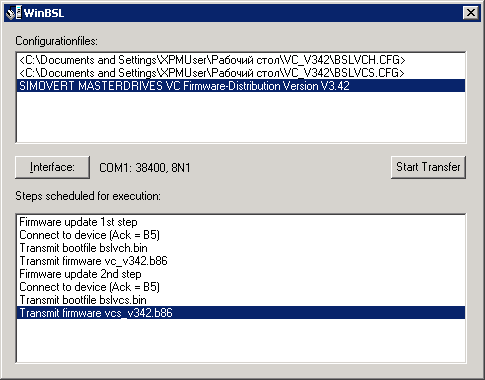
At startup, the program scans the current directory for configurationfiles (*.CFG). The files qualified will be listed into the upper listbox. Using the cursor keys, oder clicking the left mouse button, a specific configuration has to be selected. The lower listbox window will then list all the steps that are due to process for this single configuration. The size of the dialog window may be changed, in order to show longer text entries.
If appropriate and/or required, the button „Interface“ might be used to select another serial port and/or a different baudrate. Only COM-Port and baudrate are adjustable, the dataformat is fixed at 8 databits, 1 stopbit and no parity.

Pressing the „Start Transfer“ button, the download process will be triggered. While download is in progress, the lower part of the dialog window will present another listbox to you: here, the progress trace messages from the WinBSL program itself and the responses from the target device will be shown. Trace messages will be preceded by three asterics („***“) and with a black text color, responses from the device will have no prefix and will print in blue.
Clicking with the right mouse button into the trace window, will cause a popup menu to appear. This enables you to copy the messages either into the windows clipboard for further processing or to store the messages into a textfile.

Hint: double-clicking the text label „Messages“ toggles the trace window and the configured-actions-list.


Registry-Entries

All registry entries for the WinBSL program are located in the windows system registry beneath the key „HKLM\Software\Siemens\Simovis\OCX\WinBSL“. Find the following values at the „Configuration“ subkey level:


Name    Default value    Explanation
COMPort    „COM1“    Logical name of the serial port used
Baudrate    38400    Baudrate used for download
MaxTraceboxLines    2000    Maximum number of lines shown in the trace listbox. Oldest entries will be deleted first.
SaveOnExit    1    Save current configuration and layout when terminating the program
MaxConnectRetries    30    Number of retries to get a connection to the target device before giving up with an error message
Parity    0    Code for parity for download. Used to override the fixed 8N1 dataformat
Stopbits    1    Number of stopbits used with download. Used to override the fixed 8N1 dataformat.
DataSize    8    Number of databits used with download. Used to override the fixed 8N1 dataformat.
Width    0    Width of the dialog window.
Height    0    Height of the dialog window.
DeviceTraceColor    „0 0 255“    Textcolor used to display target device responses in the trace window; coded as RGB-triple (0 0 255 means blue).

Категория: SIEMENS | Просмотров: 8 | Добавил: gt7600 | Рейтинг: 5.0/1
Всего комментариев: 0
avatar